Bug Involving Keyboard Shortcuts for Menu Items That Have No Modifier Keys
May 12, 2026
I am seeing a bug in macOS 26.5 that affects keyboard shortcuts that have no modifiers and are attached to menu items. For example, the bug would affect the keyboard shortcut J on a menu item, but not the keyboard shortcut ⌘J.
I filed this as FB22762541, and am writing this to let others know about it.
I do not have a macOS 26.4 environment to test against, but based on customer input I believe this is a new bug in macOS 26.5.
The Bug
When a menu item is invoked with a keyboard shortcut that has no modifiers and its validateMenuItem(_:) method returns false, the system beeps and refuses to perform the operation. This is expected.
But then even after validateMenuItem(_:) is returning true again, the app will continue refusing to perform that keyboard shortcut until the app is quit and relaunched. It will also do the same with all other keyboard shortcuts that have no modifiers and are attached to menu items.
Sample App
To demonstrate this, I wrote a sample project.
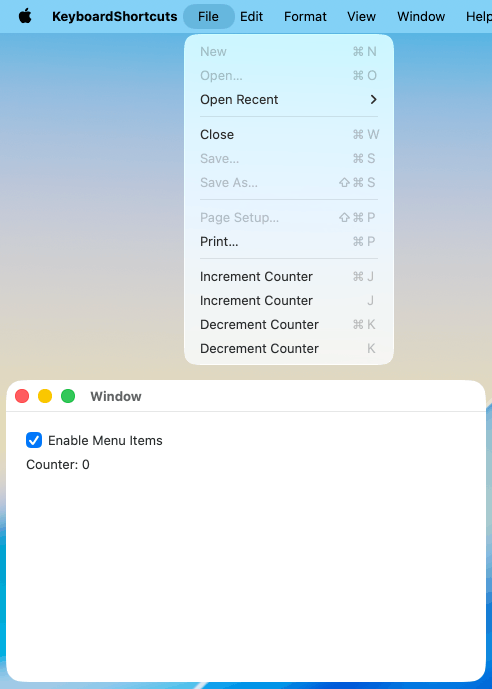
Its app shows a counter. The File menu has these menu items:
- Increment Counter (keyboard shortcut: ⌘J)
- Increment Counter (keyboard shortcut: J)
- Decrement Counter (keyboard shortcut: ⌘K)
- Decrement Counter (keyboard shortcut: K)
The app also has an Enable Menu Items checkbox. When checked, validateMenuItem(_:) returns true for the four menu items above. When unchecked, it returns false.
To see the issue:
- Run the sample app.
- Take note of the Increment/Decrement Counter menu items in the File menu.
- Increment the counter with the ⌘J and J keyboard shortcuts. Decrement the counter with the ⌘K and K keyboard shortcuts. Observe that all four keyboard shortcuts work as one would expect.
- Uncheck the Enable Menu Items checkbox.
- Open the File menu, and observe that the four menu items are disabled.
- Press the J key to increment the counter. Observe that you get a system beep and that nothing happens, as one would expect.
- Check the Enable Menu Items checkbox.
- Open the File menu, and observe that the four menu items are enabled.
- Try to increment the counter with the ⌘J and J keyboard shortcuts, and to decrement the counter with the ⌘K and K keyboard shortcuts.
Expected result: One would expect that all four keyboard shortcuts (⌘J, J, ⌘K, and K) work again.
Actual result: ⌘J and ⌘K work. When you press J or K, you get a system beep and nothing happens, as if validateMenuItem(_:) was still returning false.