July 10, 2025

I spent a significant amount of time since WWDC trying to understand how to correctly use Icon Composer, and determining how best to carry forward Unread’s alternate icons feature with this year’s changes.
Thank You
I want to thank Kaya Thomas, who helped me understand some aspects of Icon Composer that were not initially clear to me. I also want to thank the Apple engineers who helped me in two different lab sessions.
A Quick Tutorial to Using Icon Composer
I would not have figured out how to use this tool without help, so I wanted to pass along the correct way to use it. I will use Unread’s icon as an example, since it is a simple icon with three single-color shapes.
Step 1. Start with the shape.
Start with the shape as a 1024x1024 vector image file, with a white foreground color and a transparent background.

Just pretend the light gray color is white. I needed the white to be visible regardless of the webpage background color.
Step 2. Divide the icon up into individual layers.
Divide the icon up into individual layers. The shape should be a solid white. Make the foreground color white and the background color transparent. Export each as a PNG file.
Important: The WWDC “Create icons with Icon Composer” talk recommends using SVG files. If I follow that advice and use SVG files, I do not get the liquid glass effects as expected. I recommend using PNG files instead.



Step 3. Create a new icon in Icon Composer.
Open Icon Composer and create a new icon.
Step 4. Set the background color for the light mode version.
You can set Fill to Automatic, Solid, Gradient, System Light, or System Dark.
Automatic seems to mean System Light when in light mode, and System Dark when in dark mode. System Light is a near-white color. System Dark is a near-black color.
If you choose Gradient you can set the starting and ending colors. If you choose Solid you can choose the solid color.
I will choose System Light here, mostly because I want to demonstrate how to set the light mode and dark mode background colors separately.
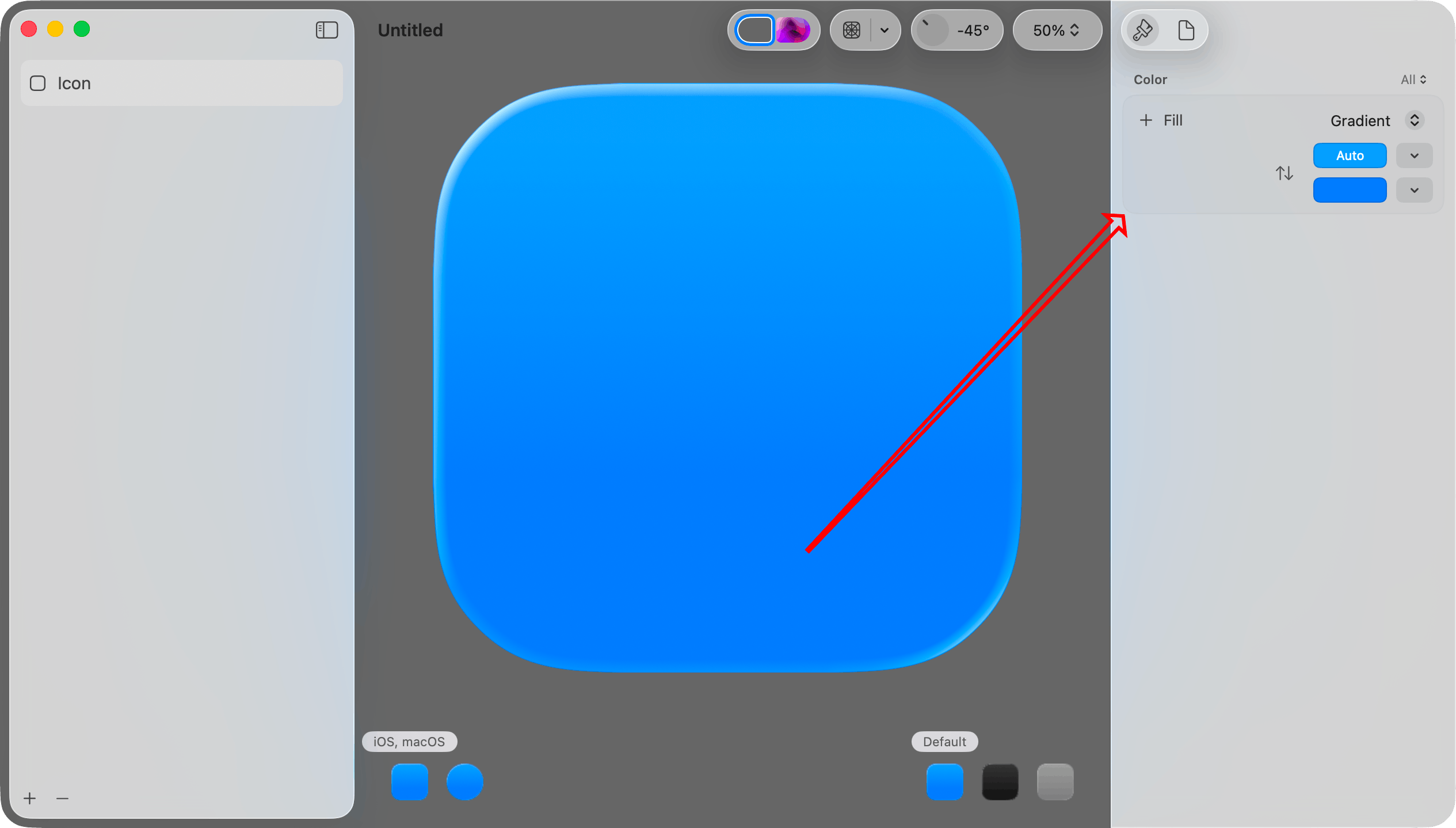
Step 5. Set the background color for the dark mode version.
First, click the Dark Mode icon in the lower left corner.
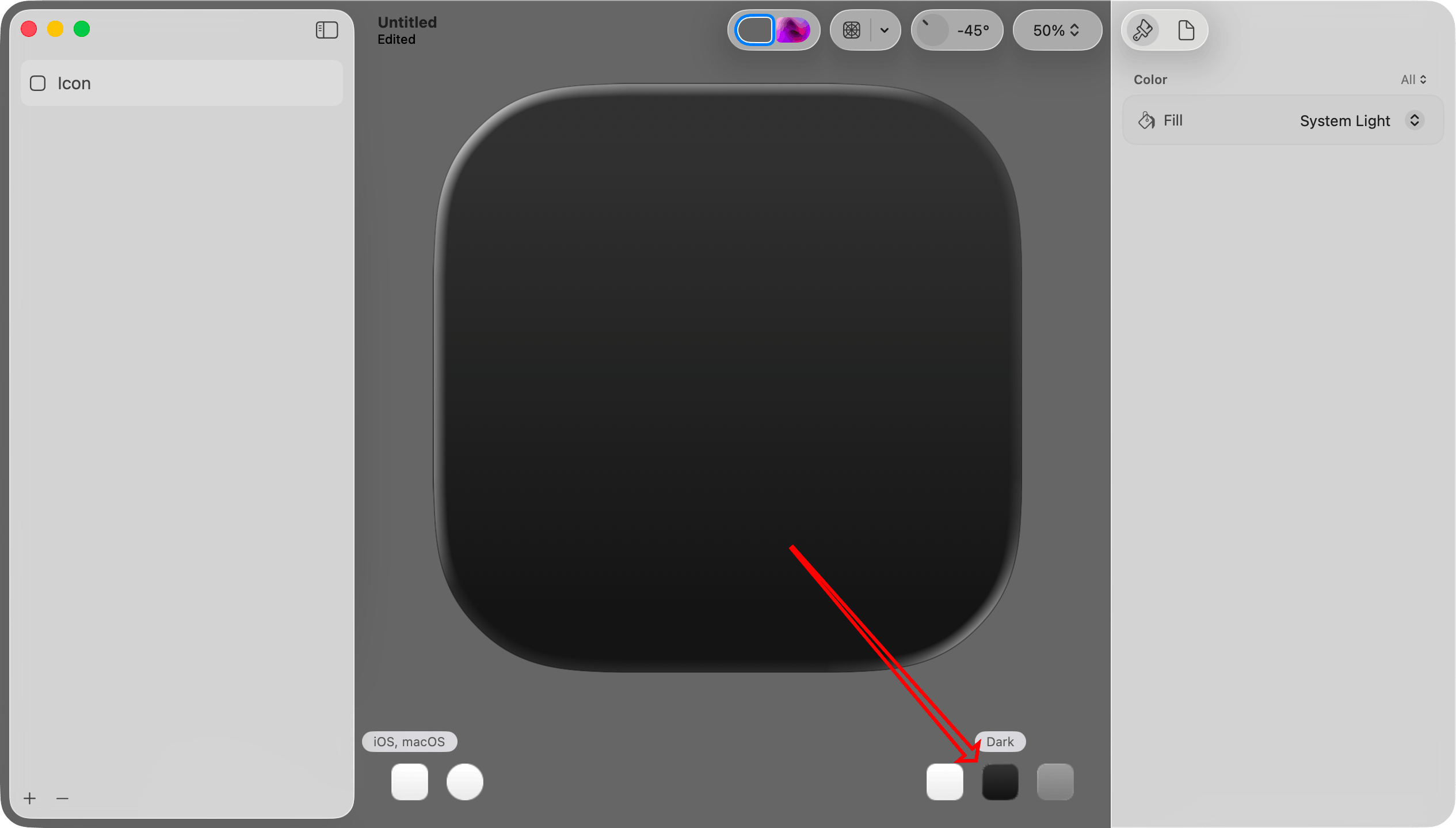
Then, at the very top right, set Color to Dark. This will make the color selection apply only to the dark mode version.
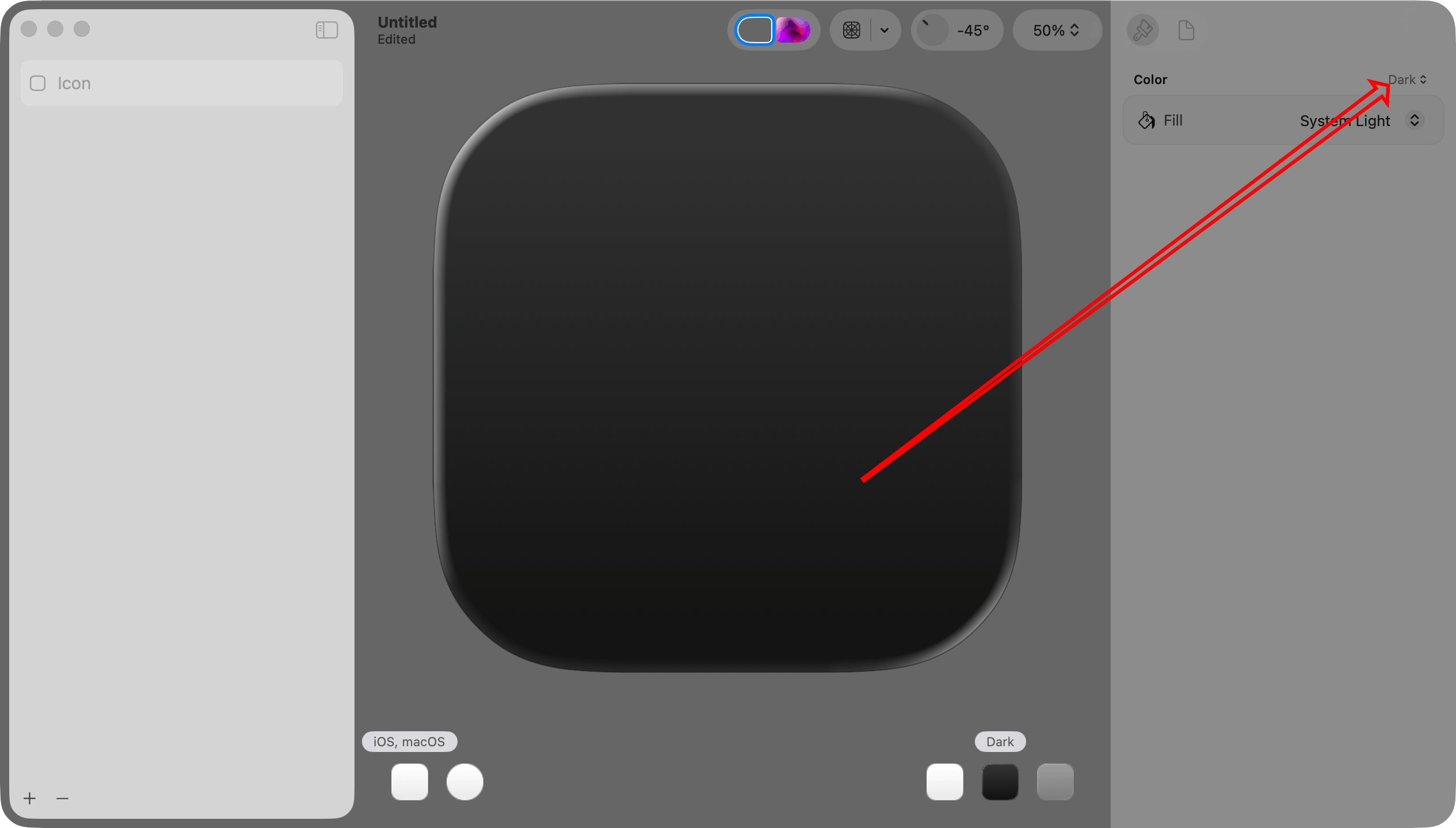
Finally, choose a Fill setting. Since Color is Dark, this setting will apply only to the dark mode version. I will set this to System Dark.
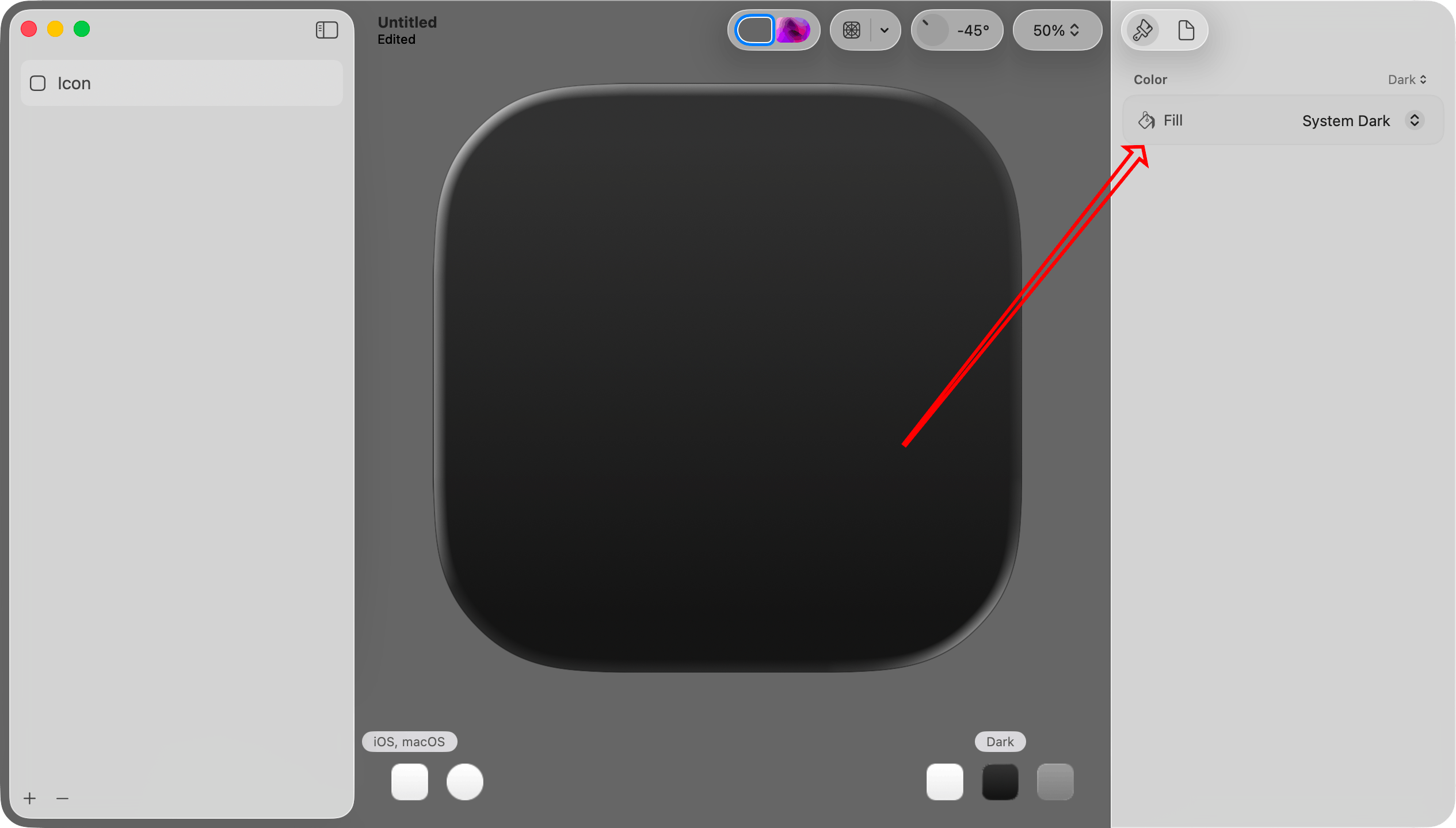
Important: This step illustrates a concept that I did not immediately understand. When you want to work with the light mode, dark mode, or mono version of the icon, you select it in the lower right portion of the canvas.
When you want to make a color change specific to the light, dark, or mono version, choose it in that Color menu at the top of the inspector pane on the right.
Each group of settings in the inspector pane on the right has its own menu. In this set of steps I work exclusively with the Color menu, but there are others as well.
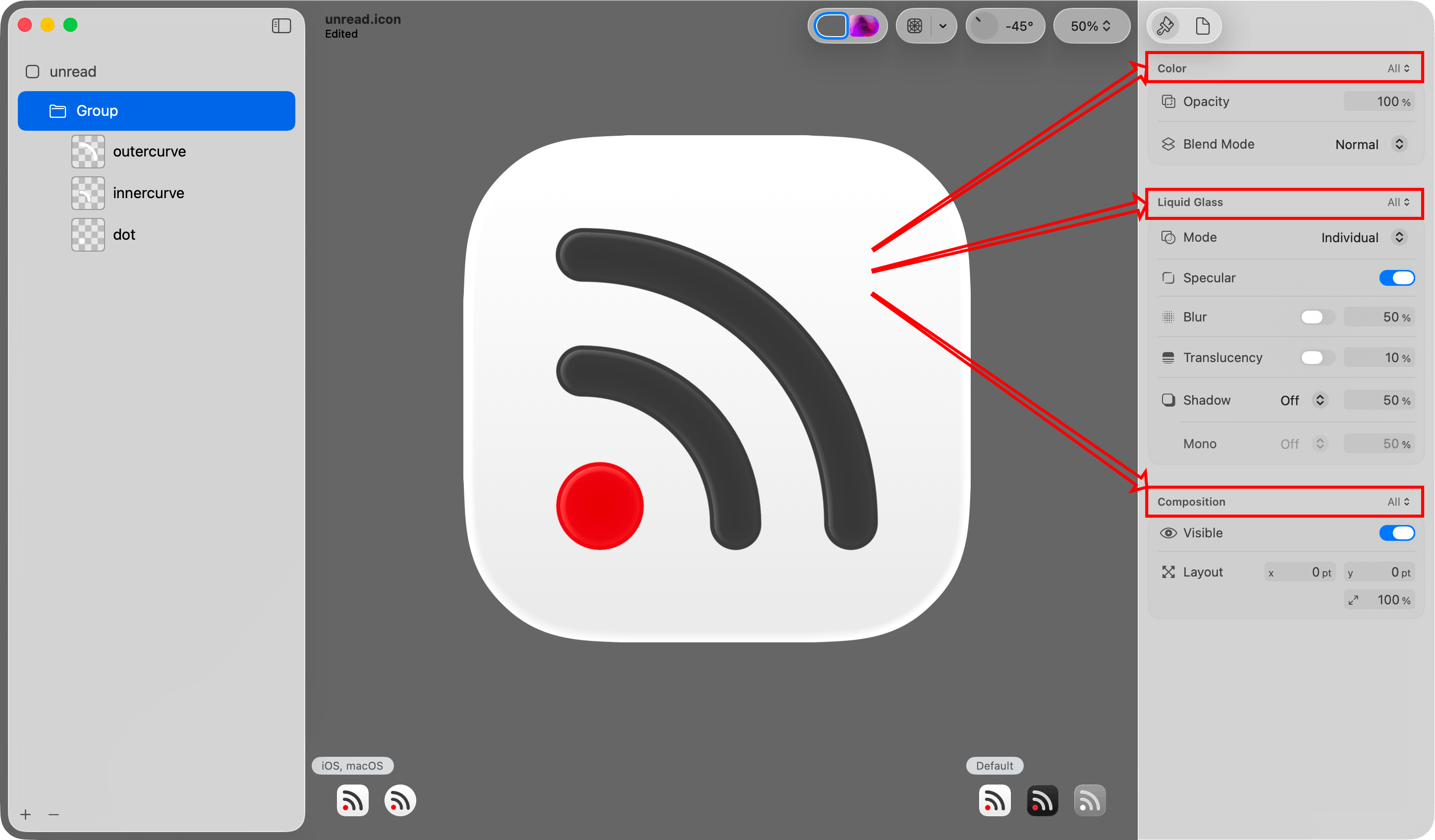
Step 6: Add the layer PNG files.
Drag and drop the layer PNG files created in step 2 onto the icon.
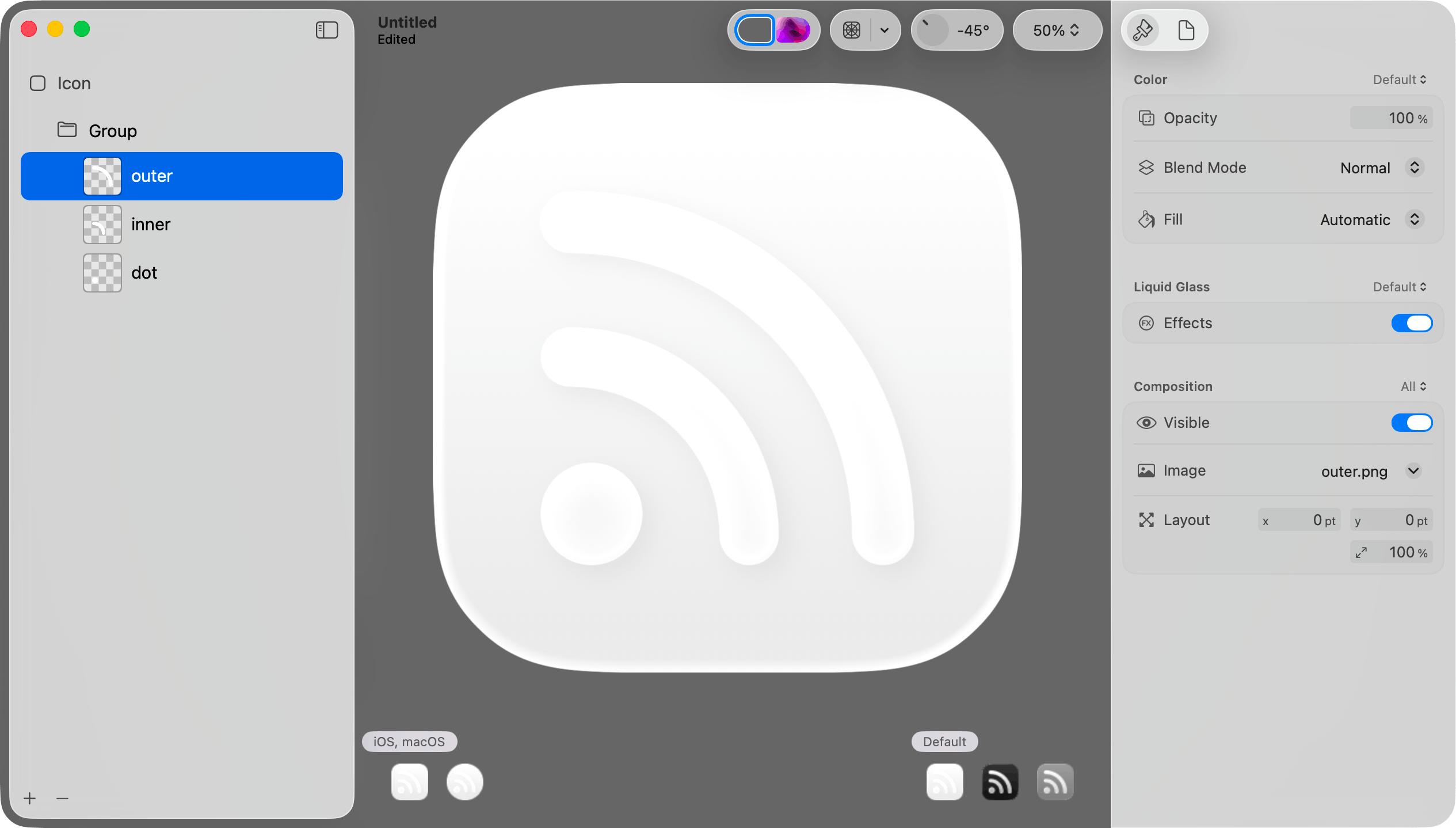
Step 7: Set the default/light mode color for a layer.
Select Default in the lower right portion of the canvas. Select a layer in the sidebar. Choose “Default” in the Color picker at the top of the inspector. Then choose a color in the Fill picker in the inspector pane on the right.
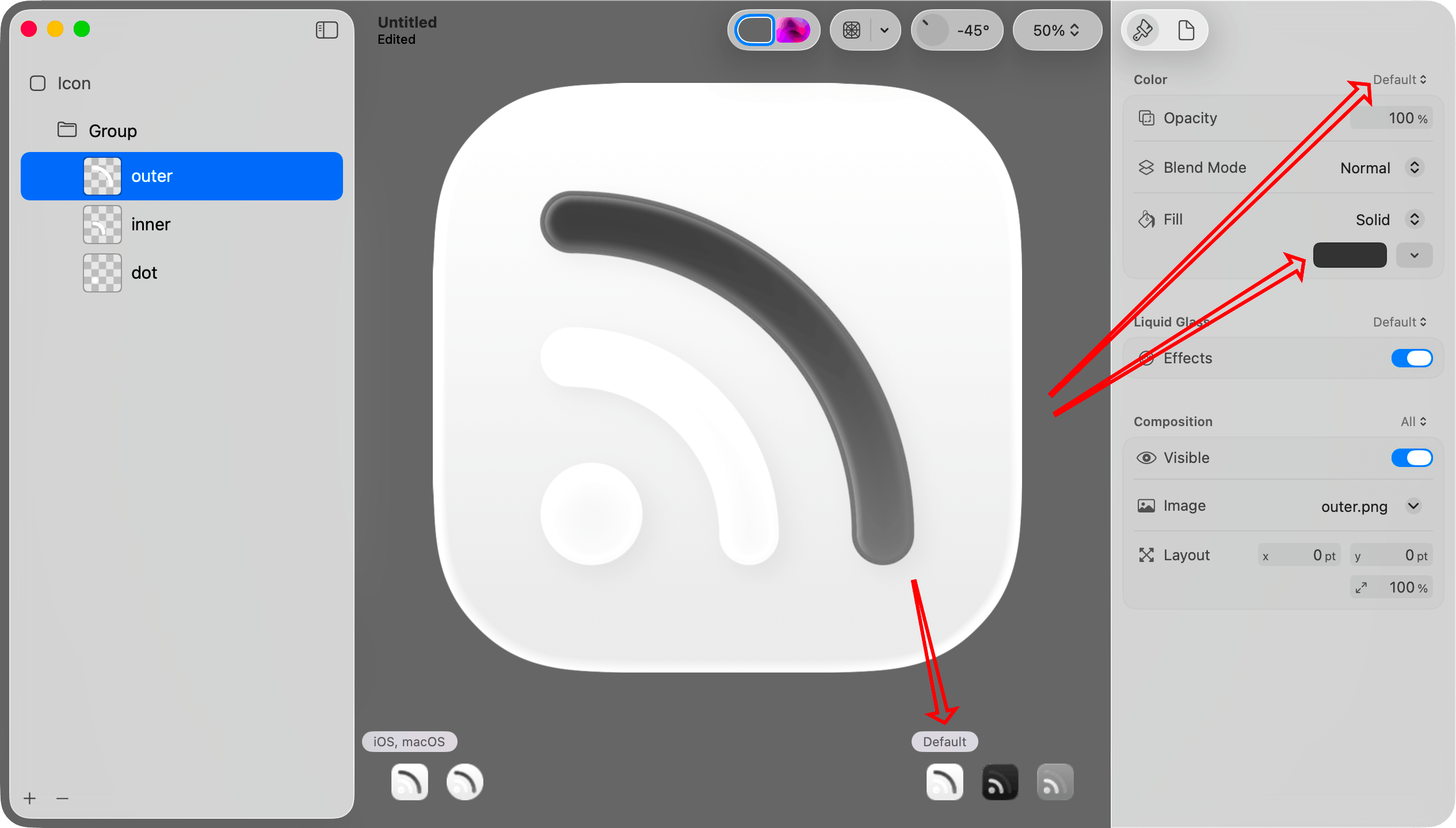
Step 8: Set the dark mode color for that layer.
Select Dark in the lower right portion of the canvas. Choose “Dark” in the Color picker at the top of the inspector. Select the same layer on the left. Then choose a color in the Fill picker in the inspector pane on the right.
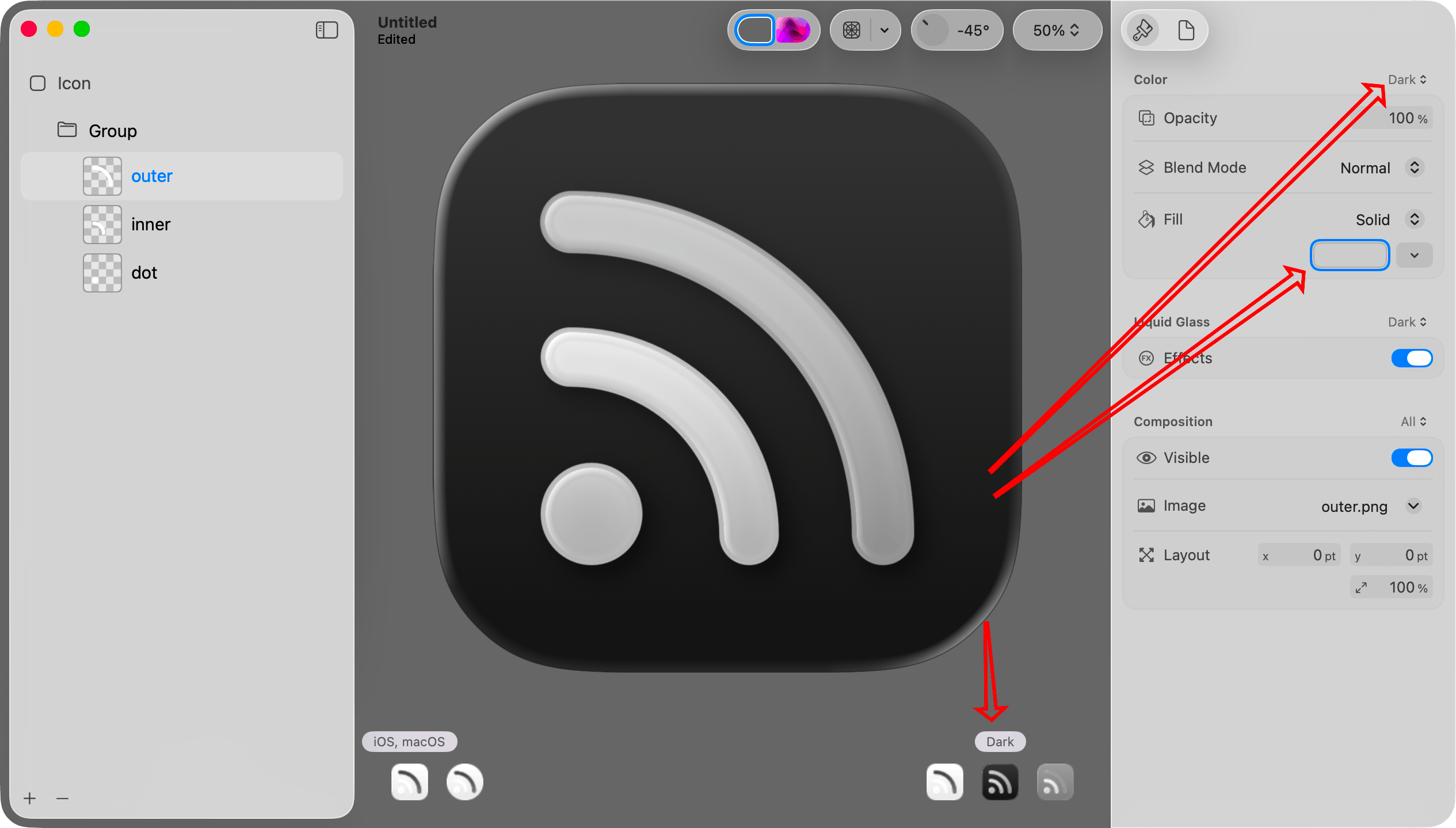
Step 9. Set the mono color and opacity for that layer.
Select Mono in the lower right portion of the canvas. Choose “Mono” in the Color picker at the top of the inspector.
It is monochrome, so I think it is best to set the color to pure white. If you want the layer to be dimmer than others, set the opacity to something less than 100%.
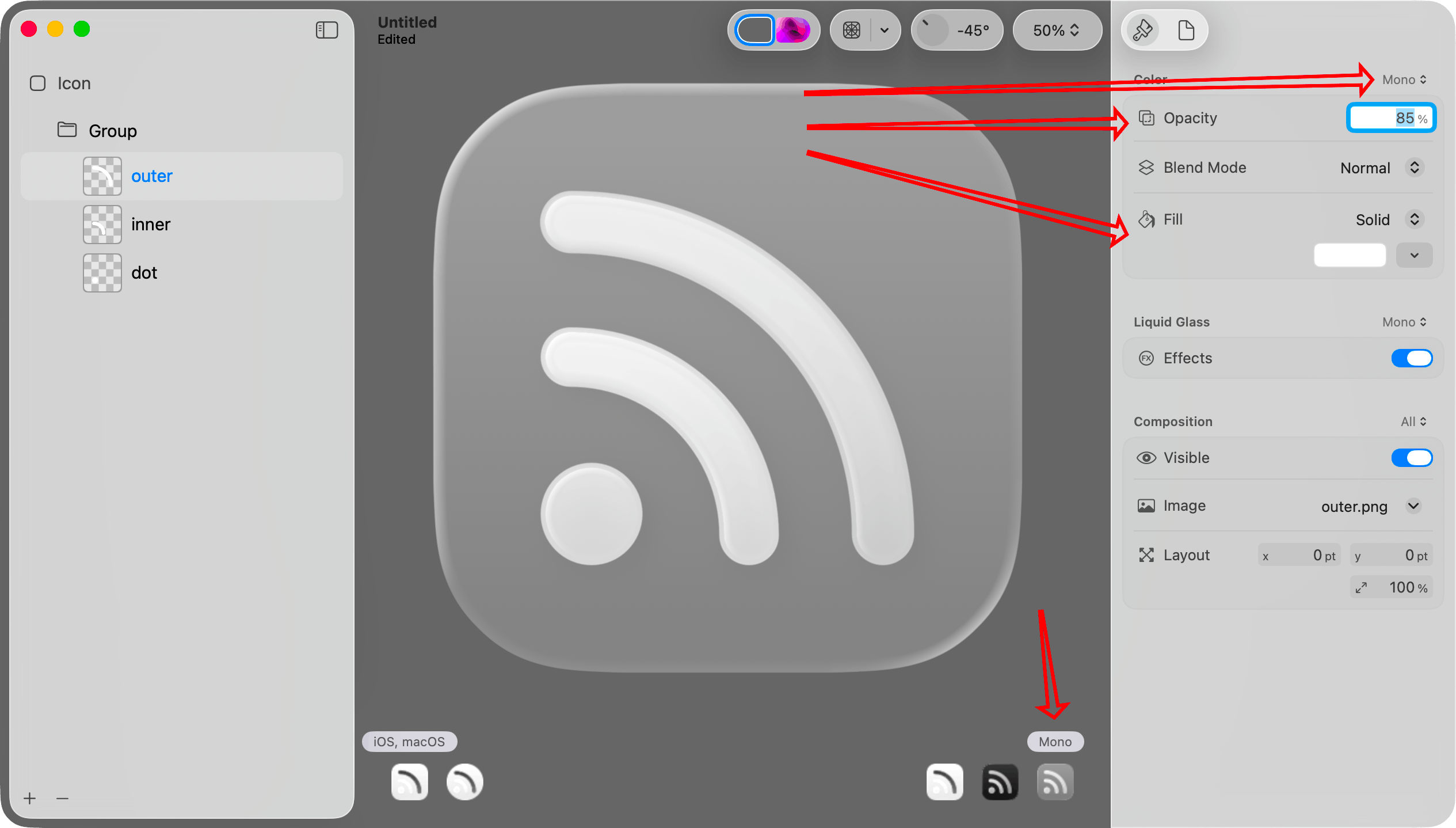
Step 10. Repeat for other layers.
Repeat steps 7 through 9 for each of the other layers.
If you look at the icons in the lower right portion of the canvas, you can see that each now looks reasonable.
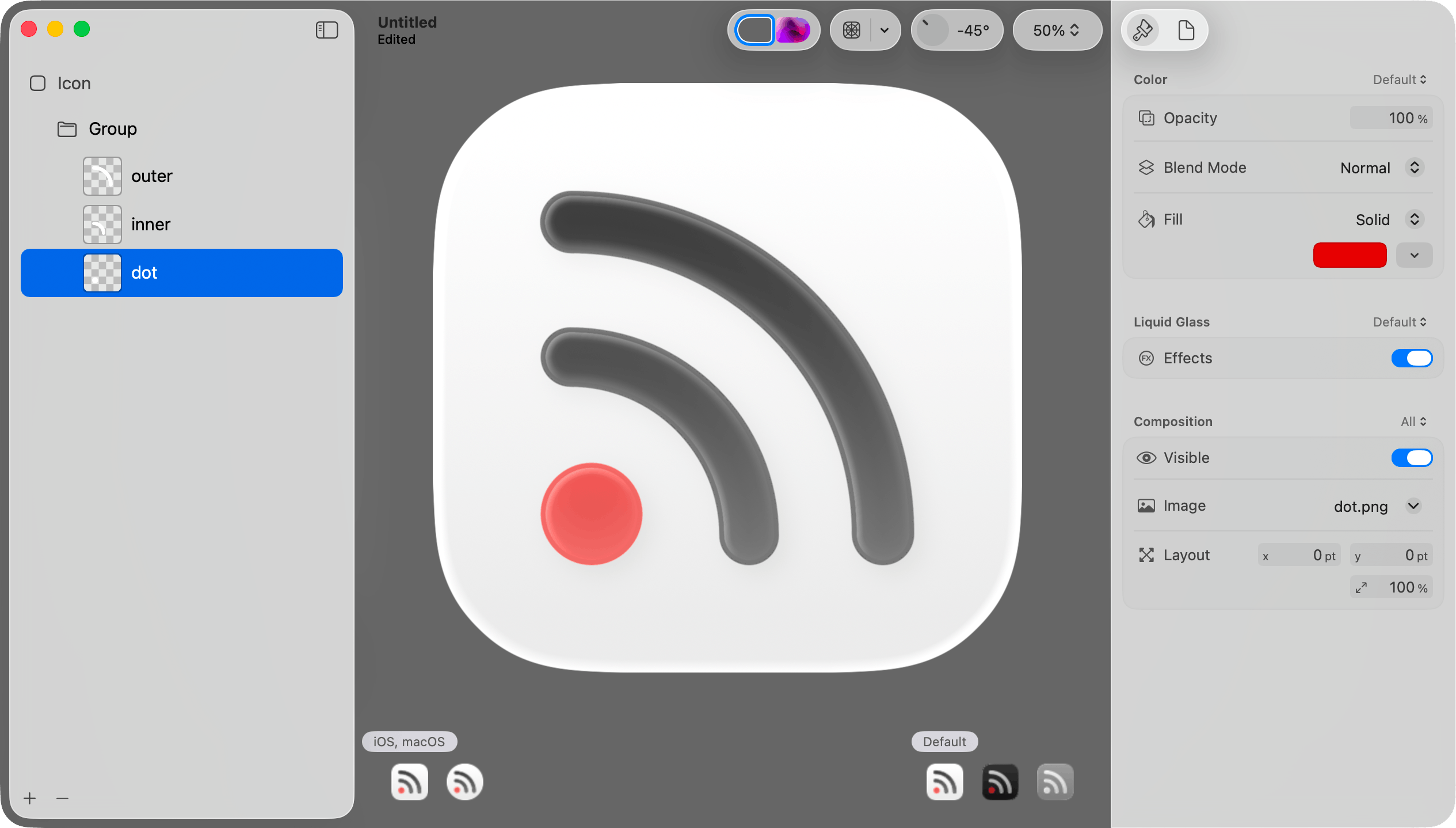
Step 11: Adjust effects on all layers in the group.
When I imported the layers, Icon Composer put them into a group. When I select that group, I can change various effects for all layers in the group. I can also move layers into different groups.
Above each group of options in the inspector pane is a menu letting you determine whether the settings should apply to all versions or just the currently selected version (default, dark mode, or mono).
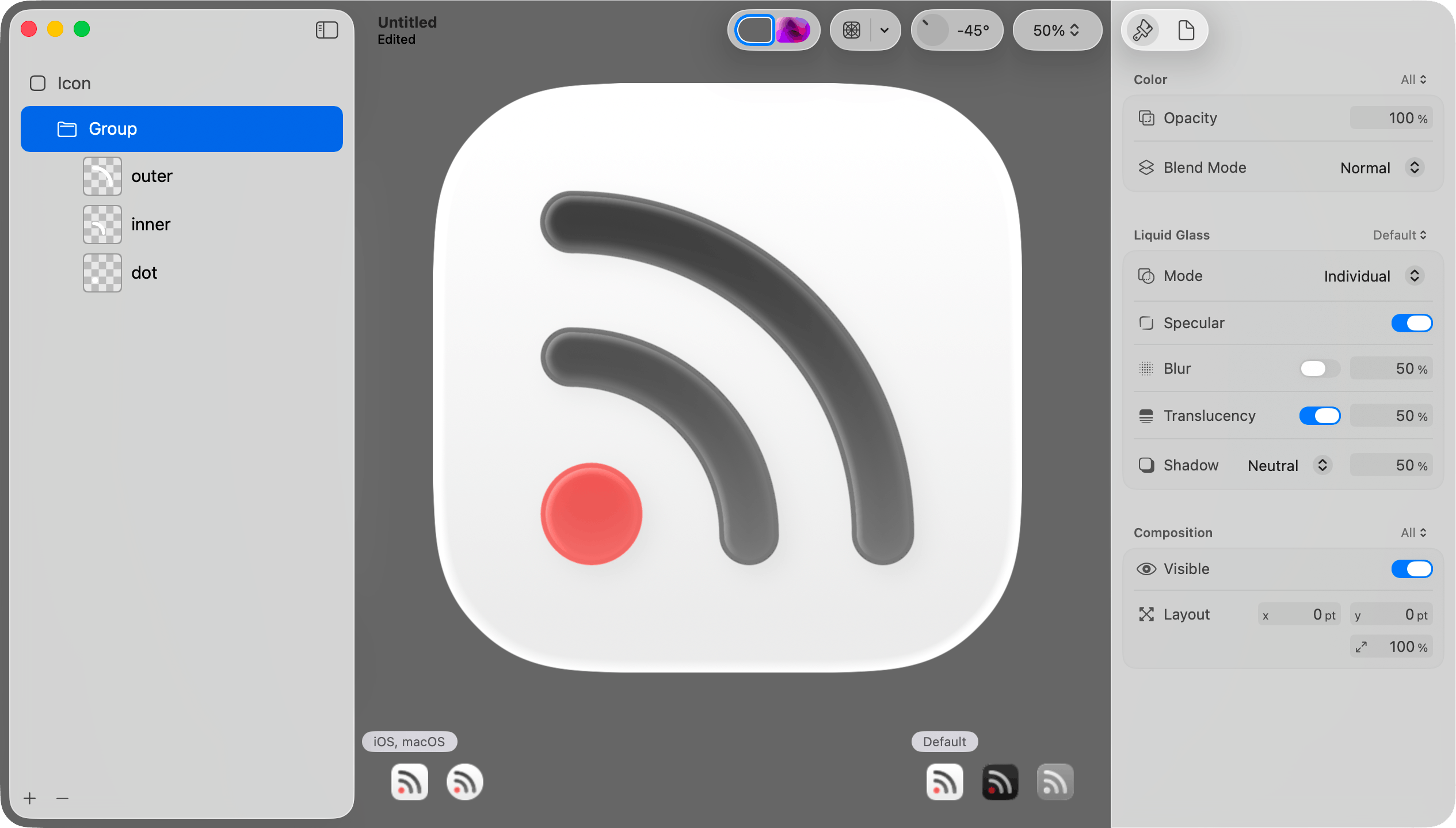
Step 12: Save the file.
Choose Save from the File menu to save the icon as a .icon file. Then add that icon to the Xcode project.
Important: Do not choose Export from the File menu. That will save to a PNG file. That will be useful in other contexts, but not when adding the default icon to the app.
The .icon file format
The .icon file is a package (a folder that convinces Finder to treat it like a single file). You can open it in Finder by right clicking and choosing Show Package Contents from the resulting menu.
When you do that, you will see that your layer images are saved in an Assets subfolder. The structure of the icon itself is specified in an icon.json file. Unread has 32 different alternate icon options. Each icon has the same shapes but uses different color combinations. I plan to automate generating these icon files based on lists of color combinations.
Alternate Icons on iOS
If your iOS app supports alternate icons, you set icons the same way you did with the prior icon format. Add the .icon files to the Xcode project. The alternate icons still need to be specified the same way in the Info.plist file. The Include All App Icon Assets setting still needs to be set to Yes in Xcode Build Settings.
If you let customers choose an alternate icon, you probably need to display the different icons in your app. I did not have success reading icons with UIImage(named: String). One could draw the icons in code, but mimicking the different effects on the image would be difficult. I think the best way for most is to export the icons to PNG files, and use those PNG files in the app to display the icons.
There is still no way to let a customer choose one icon for light mode and a different icon for dark mode.
You can export an icon to PNG file by choosing Export from the File menu.
Alternate Icons on macOS
On macOS, one sets an alternate icon by either setting NSApplication.shared.applicationIconImage to an NSImage or drawing it in code using the NSDockTile API. I believe Mac apps have no access to the system-wide Icon & widget style setting or the current tint color.
In the first developer beta of Tahoe I could create an image using NSImage(named: String) and display it in the app with an NSImageView. If the icon had any variation between the light mode version, dark mode version, or mono version, the image drawn would be the mono version. As of the third developer beta, creating an image with NSImage(named: String) with an icon file does not work at all.
When I add multiple .icon files to a Mac app, Xcode seems to only include the app’s default icon. It seems to ignore the others. The icon is included as a .icns file that appears to be generated from the .icon file. It is probably possible to generate those .icns files some other way and include those as resources.
The content view for an NSDockTile is always 128x128. Therefore if you decide to store the icons as PNG files, 256x256 image files should be sufficient.
Alternative dock icons for Mac apps are only used when the app is running.
Automating Exports of Icon Files to PNG Files
Icon Composer contains an icontool executable that you can use on the command line to generate PNG files from .icon files created with Icon Composer. It is at this path under the Xcode app bundle:
Contents/Applications/Icon Composer.app/Contents/Executables/icontool
From a directory containing an unread.icon icon file, I was able to make icontool generate a 256x256 PNG file for macOS by invoking it as follows:
"/Applications/Xcode-26.0.0-beta.3.app/Contents/Applications/Icon Composer.app/Contents/Executables/icontool" unread.icon --export-preview macOS Light 256 256 1 unread.png
Supporting Old Versions of the Operating Systems
For iOS, Xcode automatically generates a flatter version of the app icon for iOS 18 and earlier. I did not find a way to use an entirely different version of an app icon on iOS 18 and earlier.
On macOS, it seems that you need to also have the app icon in the asset catalog. Sequoia or earlier will use the icon from the asset catalog. Tahoe will use the icon from the .icon file.
My Plan for Unread
Today icon selection in Unread works as follows:
On Mac, the customer can choose between one of 32 different icons.
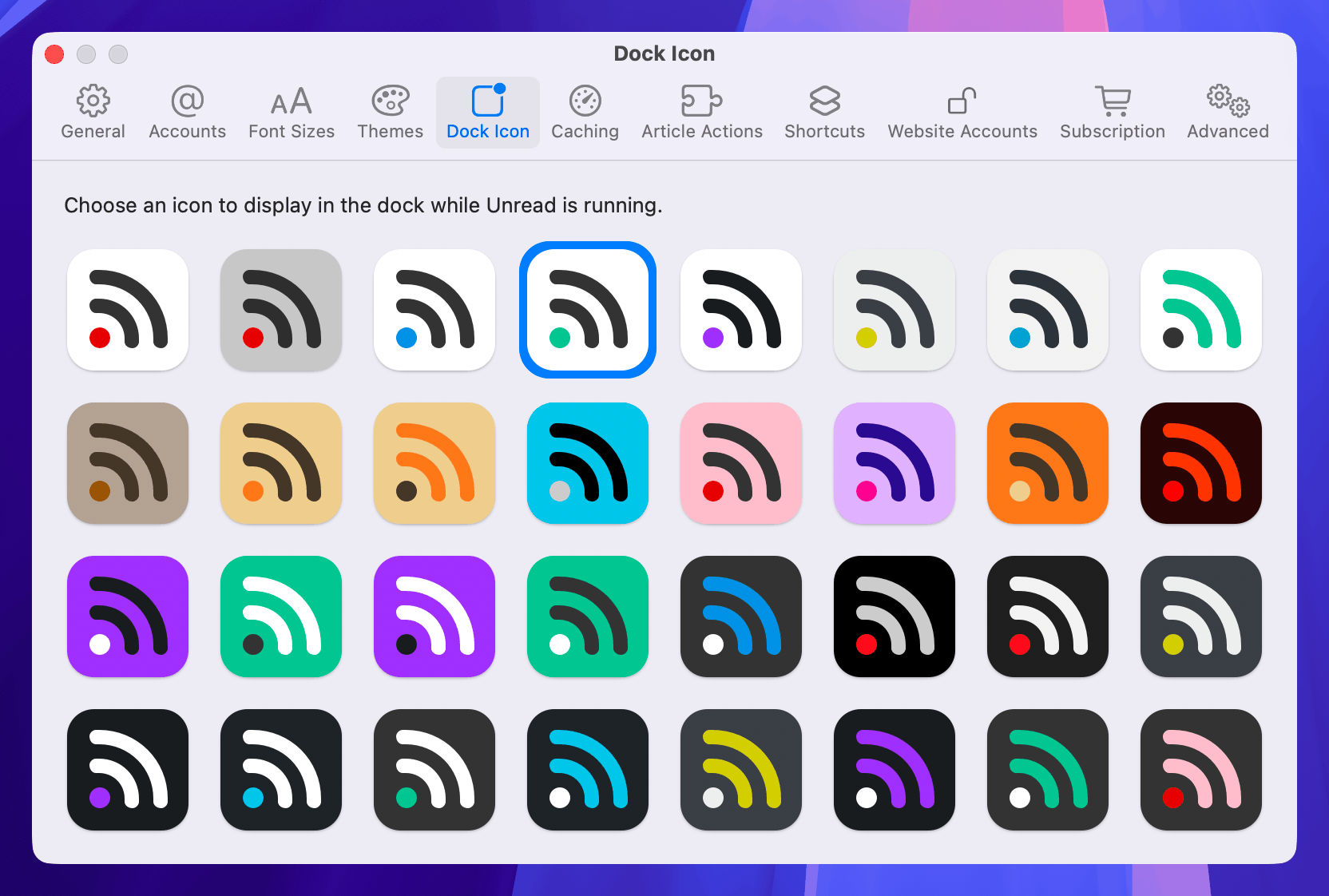
On iOS, the default icon has a light mode version and a dark mode version. All icons have the same mono version for tinting.
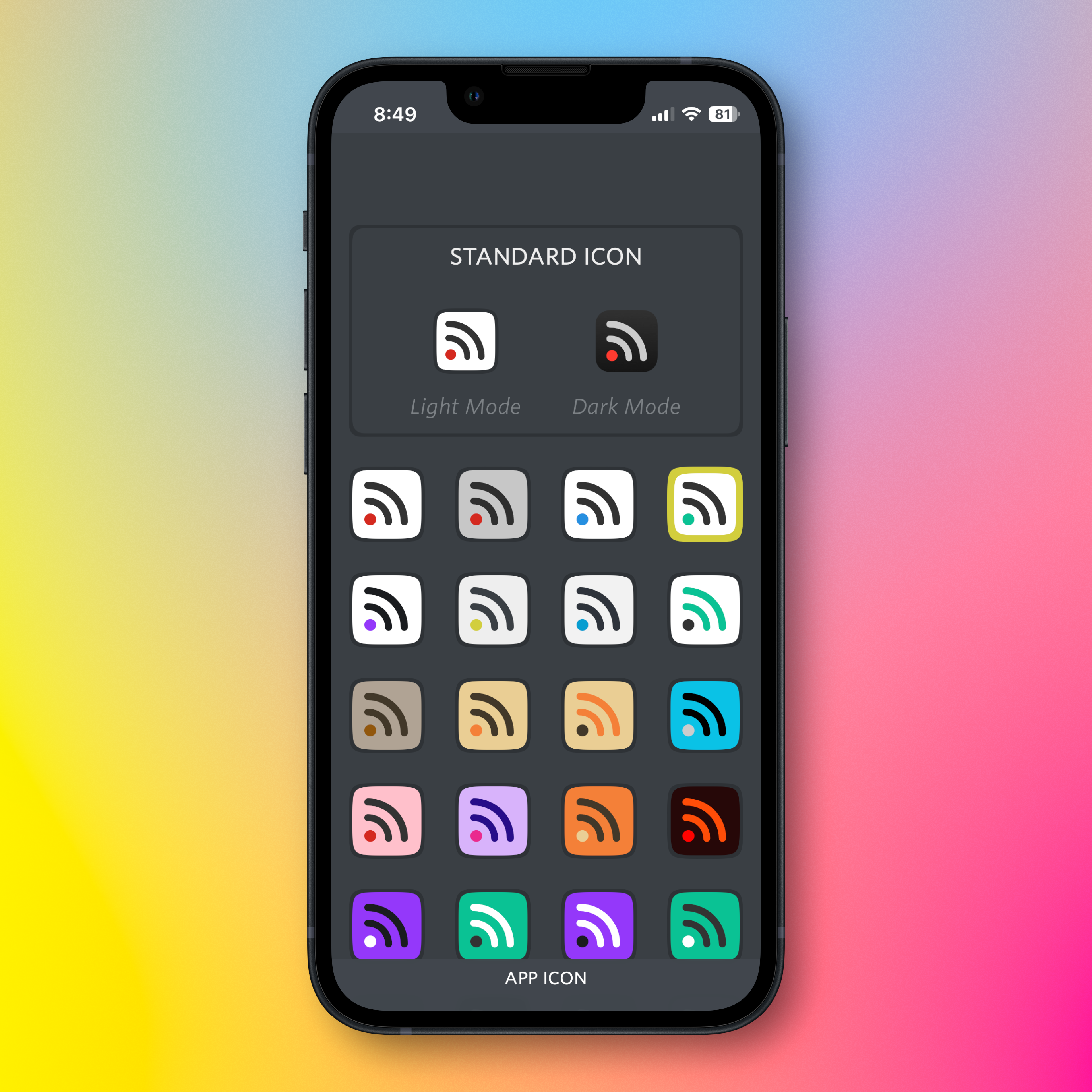
My plan for Unread is:
- Make the default icon on Mac the same as it is on iOS with a light mode version and a dark mode version.
- Each of the 32 alternative icons on Mac will have a constant color palette, without light, dark, or mono versions.
- Automate generating each of the 32 alternate
.icon files and their exported .png files.
Feedback Assistant Reports
If anyone at Apple happens to read this, these are relevant Feedback Assistant reports:
- FB18097334: Icons with SVG layers do not get the liquid glass effects as expected
- FB18096324: macOS needs an equivalent to UIApplication.shared.setAlternateIconName(…)
- FB18093372: In macOS apps, no way to include additional Icon Composer-generated .icon files
- FB18091397: On macOS, showing an Icon Composer-generated icon in the app via NSImage and NSImageView shows the monochrome version
- FB18027769: Creating a UIImage from a .icon file created with Icon Composer does not work
- FB13999626: iOS Home Screen Personalization and Alternate Icons
Update 2025-06-22: Added note that an alternative icon on macOS can be set by setting NSApplication.shared.applicationIconImage to an NSImage, and that alternative icons for Mac apps are only shown in the dock while the app is running.
Update 2025-07-10: Posted this as a new article on my longform blog, copying it from my microblog. Added the “Supporting Old Versions of the Operating Systems” section. Noted that creating an NSImage from a .icon no longer works in the third developer beta of Tahoe.
March 14, 2018
A recent conversation on the Core Intuition Slack channel got me thinking about keeping up with customer App Store reviews via RSS. Apple provides Atom feeds for reviews, but to get all reviews you need to subscribe to one feed per storefront (country). Apple’s feeds include star ratings, but not in a manner that an aggregation service will absorb or that a reader will display. Finally, the feed names do not include the product name, so it is not always apparent what app a review is discussing.
I took some time to write a script to address this. The script combines all recent reviews of an app into a single JSON Feed. It embeds the star rating into the review content. It also embeds a Google Translate link into the content so that if the review is in a foreign language I can get a translation with one tap. My web server runs the script periodically and I subscribe to the resulting feeds.
The script is available on GitHub for anyone else who might find it useful.
February 26, 2018
My most recent update to Unread included a fix for an odd bug. The steps to reproduce it were:
- Open Unread on an iPad.
- Put the iPad in landscape orientation.
- Scroll to the bottom of any scrollable view.
- Press the home button to leave the app.
- Open the app again.
Expected Result: When returning to the app, one would expect the scroll position to be unchanged.
Actual Result: The user would be scrolled up a few hundred points from the bottom.
When digging into this, I found that I can write a trivial app and reproduce the behavior. Here is a video of exactly that:
This only happens on the iPad, and it only happens when in landscape mode. It also only happens with apps that do not require the full iPad screen. I introduced the issue into Unread when I added Split View and Slide Over support just by removing the UIRequiresFullScreen key from Info.plist.
I can reproduce the behavior in a variety of Apple apps including Mail, Notes, App Store, Contacts, and Files. In some cases the Apple app scrolls all the way to the top instead of just a few hundred points up.
I believe this is the result of iOS generating portrait orientation thumbnails. When you leave the app, the view controller’s viewWillTransition method gets called with the portrait size and then again with the landscape size. When transitioning to a taller size while scrolled to the bottom, the scroll view has to adjust the content offset. It does not revert the scroll position change when reverting the orientation change. I filed Radar 37650722 describing the issue.
I wrote some code to fix this for Unread. The code is generic enough to work for just about any UIScrollView, so I made the source for a sample app with the fix available on GitHub.
January 20, 2018

December 22, 2016
President Obama at his end-of-year press conference (transcribed by the White House):
So I do think it's worth us reflecting how it is that a presidential election of such importance, of such moment, with so many big issues at stake and such a contrast between the candidates, came to be dominated by a bunch of these leaks. What is it about our political system that made us vulnerable to these kinds of potential manipulations — which, as I've said publicly before, were not particularly sophisticated.
This was not some elaborate, complicated espionage scheme. They hacked into some Democratic Party emails that contained pretty routine stuff, some of it embarrassing or uncomfortable, because I suspect that if any of us got our emails hacked into, there might be some things that we wouldn’t want suddenly appearing on the front page of a newspaper or a telecast, even if there wasn’t anything particularly illegal or controversial about it. And then it just took off.
…
I mean, think about it. Some of the people who historically have been very critical of me for engaging with the Russians and having conversations with them also endorsed the President-elect, even as he was saying that we should stop sanctioning Russia and being tough on them, and work together with them against our common enemies. He was very complimentary of Mr. Putin personally.
That wasn’t news. The President-elect during the campaign said so. And some folks who had made a career out of being anti-Russian didn’t say anything about it. And then after the election, suddenly they’re asking, well, why didn’t you tell us that maybe the Russians were trying to help our candidate? Well, come on. There was a survey, some of you saw, where — now, this is just one poll, but a pretty credible source — 37 percent of Republican voters approve of Putin. Over a third of Republican voters approve of Vladimir Putin, the former head of the KGB. Ronald Reagan would roll over in his grave.
…
I do hope that we all just take some time, take a breath — this is certainly what I’m going to advise Democrats — to just reflect a little bit more about how can we get to a place where people are focused on working together based on at least some common set of facts. How can we have a conversation about policy that doesn’t demonize each other. How can we channel what I think is the basic decency and goodness of the American people so it reflects itself in our politics, as opposed to it being so polarized and so nasty that, in some cases, you have voters and elected officials who have more confidence and faith in a foreign adversary than they have in their neighbors.
And those go to some bigger issues. How is it that we have some voters or some elected officials who think that Michelle Obama’s healthy eating initiative and school nutrition program is a greater threat to democracy than our government going after the press if they’re issuing a story they don’t like? I mean, that’s an issue that I think we’ve got to wrestle with — and we will.
People have asked me how do you feel after the election and so forth, and I say, well, look, this is a clarifying moment. It’s a useful reminder that voting counts, politics counts. What the President-elect is going to be doing is going to be very different than what I was doing, and I think people will be able to compare and contrast and make judgments about what worked for the American people.
December 16, 2016
I believe the legitimacy of the November 8 election hinges in part upon whether Donald Trump colluded with the Russian government in order to win the election. There are many pieces of circumstantial evidence that he did.
Trump's July 27 Press Conference
On Wednesday, July 27, Donald Trump said, “Russia, if you’re listening, I hope you’re able to find the 30,000 emails that are missing”. He started that same press conference by saying, “so it's been 235 days since crooked Hillary Clinton has had a press conference, and you as reporters who give her all these glowing reports should ask why, and I'll tell you why”. Ironically, that July 27 press conference is his most recent.
Inviting Russia to hack Secretary Clinton's email was unquestionably a misstep, but by Trump standards it was only a moderate gaffe if you assume that Trump had no knowledge or involvement with the DNC hacking. Remember that this was the same candidate who picked a fight with the Khan family, attacked a Miss Universe contestant for her weight, called for jailing Secretary Clinton, hinted that second amendment advocates could assassinate Secretary Clinton, and mocked a disabled reporter. In that context, half-jokingly calling on Russia to hack into Secretary Clinton's email would hardly be noteworthy if he had no communication with the Russian government.
If Trump was colluding with the Russian government to break into Secretary Clinton's email, this was a huge blunder — big enough to warrant making it his last press conference of the campaign. He did exactly that.
The Third Debate
On May 27 Trump said (48:28), “I spoke directly and indirectly with President Putin, who could not have been nicer”.
Five months later at the third debate (47:16) Trump made the statement, “I don't know Putin”. Neither the moderators nor Secretary Clinton implied that he knew Putin. It is highly suspect that Trump felt the need to deny knowing Putin when no one said he did.
The Wisconsin Rally
At the Wisconsin Rally of his thank you tour, he said about Dr. Jill Stein, “she got less than one percent but she thought she was going to catch us”. Dr. Stein was only asking for a recount, not a criminal inquiry. Yet Trump used the phrase “catch us” as if Trump had something to hide.
Trump's Conspiracy Theory
On October 13 Trump said, “we've seen this firsthand in the WikiLeaks documents in which Hillary Clinton meets in secret with international banks to plot the destruction of U.S. sovereignty in order to enrich these global financial powers, her special interest friends, and her donors”. Ignore the fact that the WikiLeaks documents reflect no such thing. At the time this seemed like an absurd accusation to make about either candidate.
Based on Trump's alleged relationship with Russia, his increasingly apparent conflicts of interest, and his absurd choices of cabinet nominees, it is clear that this accusation was an exhibition of one of his narcissistic tendencies: projecting his own motives onto his opponent.
Conclusion
Our intelligence agencies undoubtedly have much more knowledge about the existence of a Trump-Putin relationship than we do, but these events combined make it seem very likely that Trump colluded directly with the Russian government to illegally win the election.
December 12, 2016
I posted this one to Medium as an experiment. This blog and Twitter are still the best places to follow me.
December 2, 2016
I just sent this letter to the Office of Government Ethics:
I am a citizen from Massachusetts. I am writing because I am concerned about the President-elect's conflicts of interest from his business. I am also concerned that your office sent out a tweet storm Wednesday congratulating the President-elect on his announcement that he will leave his business. His commitment to leave his business is vague. It is likely that he will retain a financial interest in his business, and that his children will be running his business. That does not constitute a blind trust. I hope that the Office of Government Ethics intends to more diligently ensure that the President-elect is not subject to conflicts of interest.
Thank you for your time.
I sent it to both their email address (ContactOGE@oge.gov) and to their postal address:
U.S. Office of Government Ethics
1201 New York Avenue, N.W., Suite 500
Washington, DC 20005
If you agree with the sentiment, I encourage you to do the same. I called the office, but was unable to find someone charged with taking messages from the general public.
November 25, 2016
I am in favor of several movements to stop Donald Trump taking the oath of office, such as this petition for the Electoral College to elect a President other than Trump.
My lack of confidence in Donald Trump goes far deeper than his positions, his conflicts of interest, and his incompetence. I am not confident that Trump will not launch a nuclear attack over matters as insignificant as those behind his Twitter attacks. I am not confident that Trump will allow free elections to happen during his Presidency. I am not confident that Trump will leave the White House peacefully when his term expires or after he is impeached and convicted of a crime.
Some warn that preventing Trump from taking the oath of office after what is believed to be a fair election will lead to civil war and destruction of our democracy. This is a valid concern and one I take seriously. However I also question the ability of our democracy to survive a Trump Presidency. Given the nuclear weapons under the control of the executive branch, I question the ability of human civilization to survive a Trump Presidency.
November 14, 2016
The election is over and 52 individuals who are currently registered as Republicans have been elected to serve in the 115th Congress, but I cannot believe that those 52 Republicans share Donald Trump's vision of America. Many Republican senators either withdrew their early endorsements of Trump or opposed him from the beginning.
The 2016 Republican Party is not the party that Republican senators joined. It is a party following the lead of Donald Trump and Mike Pence. Trump's campaign statements were inconsistent enough to leave a glimmer of hope that his intentions were less horrific than some of his promises, but early signs paint a picture that is even more bleak.
One glimmer of hope is that the Republicans have a narrow 52-48 majority in the Senate. I believe that convincing two or three Republican senators to leave the Republican Party is achievable. The senators can either join the Democratic Party or serve as independents caucusing with the Democrats. This would create the system of checks and balances that our political system is supposed to provide.
My best guess is that the Republican senators most likely to consider this are Senator Susan Collins of Maine, Senator Lisa Murkowski of Alaska, Senator Dean Heller of Nevada, Senator Pat Toomey of Pennsylvania, and Senator Rand Paul of Kentucky. Senator John McCain of Arizona is a career staunch Republican, but I doubt that even he wants Trump to take office without a strong opposition party.
A Democratic Senate would be a step toward providing the checks and balances needed to limit the damage of a Trump administration. It would help to prevent an extremist from taking a seat on the Supreme Court and to prevent hate-motivated legislation from passing.
Removing the Republicans' control over the Senate needs to happen, but it will not happen by itself. We all need to campaign hard for it.
Regardless of the political party of your Senators, please call them. If you are calling the office of a Republican senator, point out that the Republican Party has become one of white supremacy, misogyny, antisemitism, and homophobia — something very different from the Republican Party that the senator joined. If calling the office of a Democratic senator, ask that the Senator discuss this with his or her Republican allies in the Senate.
For my friends here in Massachusetts, Senator Ed Markey's office can be reached at 617-565-8519 and Senator Elizabeth Warren's can be reached at 617-565-3170. The Senate web site has phone numbers for current senators. If you have a newly-elected senator who is not in office yet, call the campaign office. This tweet storm by a former Congressional staffer has great advice. One of those pieces of advice is that phone calls are far more effective than email or any other medium. Talk to a human who is listening to you. Don't just leave a voice message.
Please put forward a significant effort to making this happen. Call the offices of senators that represent your state. Ask your friends and family to do the same. Tweet. Blog. Post on Facebook. We can do this.
Updated 11/15/2016 to account for the runoff race in Louisiana.
Updated 12/20/2016 to reflect the fact that the Louisiana runoff race is over.
November 12, 2016
Yesterday I wrote the following:
Today the Republican Party is the party of Donald Trump. The party of Mike Pence. The party of blood coming out of her wherevers. The party of grab her by the… The party of travel bans for members of some faiths.
The Democratic Party nobly fights for many causes with which some will reasonably disagree. It fights for gun control in an effort to stop the wave of mass shootings that has plagued this country, but some believe that strict gun laws create an environment where only criminals have guns. It fights for a system in which health care is available to everyone regardless of his or her ability to pay, but some believe that government-managed health care creates so much bureaucracy that it reduces the quality of available health care while also increasing the cost. It fights for a progressive tax system so that the government can afford to provide services without straining those with low income, but some believe that this creates a system where the financially successful are unfairly penalized.
I have immense respect for third parties, but let's face it: the Democratic Party is the only party with a prayer of getting us out of this mess within the next four years. In order to do so it needs to quickly become the party behind which we can unite.
It needs to simplify the platform. It needs to become a single-issue party. It needs to become the party against fascism, against bigotry, against misogyny, against hatred, against discrimination. It needs to fight for the members of all races, all religions, all sexual orientations, and all gender identities.
Debates about gun control, health care, taxes, and many other issues should be had but they are trivial in the context of this country's crisis. As it stands today, there are many good reasons for someone to have reservations about getting behind the platform of the Democratic Party. This is healthy in a democracy in which both major parties have great intentions but different opinions. Sadly that no longer describes this country.
November 11, 2016
Republican politicians like to claim that theirs is the party of Abraham Lincoln and the party of Ronald Reagan. It is not. A political party is made up of its current leaders, its current ideologies, and its current actions. The Republican Party was the party of Abraham Lincoln in the 1860s. It was the party of Ronald Reagan in the 1980s.
Today the Republican Party is the party of Donald Trump. The party of Mike Pence. The party of blood coming out of her wherevers. The party of grab her by the… The party of travel bans for members of some faiths. The party of the birther movement. The party of I'll keep you in suspense. The party of fat shaming women. The party of you have to go after the families. The party of 3am Twitter tantrums. The party of building a Berlin Wall between ourselves and our neighbors in Mexico. The party of I never said that. The party of conversion therapy. The party of leaving a Supreme Court seat vacant for a year.
Many politicians and voters joined and supported the Republican Party because of what it was. It has become something different, something horrific. If you are a member of the Republican Party, I implore you to reconsider your party affiliation. My greater hope is that Republican Senators and Representatives leave the party, removing its power from the legislative branch.
Archives